

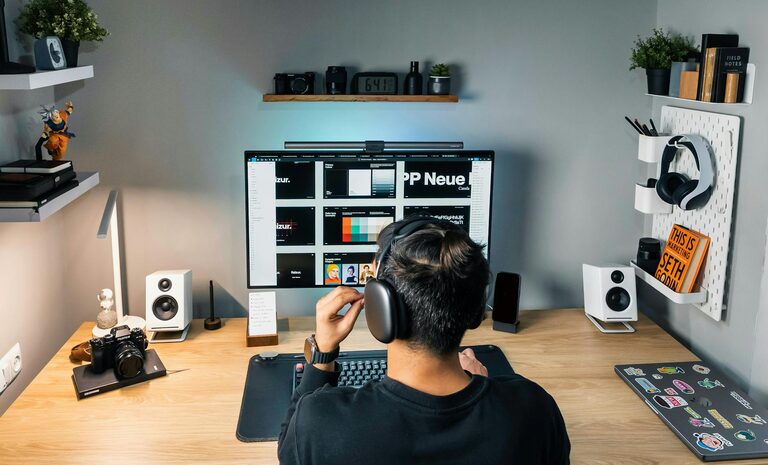
Creating a home office that is both clutter-free and productive can significantly improve your work-from-home experience. Whether you use your office for a few hours a day or full-time, organizing your space effectively helps reduce distractions and keeps your mind clear and focused. In this post, we’ll share practical tips and ideas to help you design a workspace that supports your productivity and maintains a tidy environment.
Why a Clutter-Free Home Office Matters
A cluttered workspace can increase stress and make it harder to focus on tasks. When papers, supplies, and electronics are scattered around, it’s easy to waste time searching for what you need. A clean and organized office, on the other hand, promotes efficiency and creates a more inviting atmosphere where you’ll feel motivated to work.
Start with Decluttering
Before organizing, start by decluttering your workspace. Removing items you don’t need or use regularly frees up space and reduces distractions.
– Clear your desk: Take everything off your desk and only put back the essentials.
– Sort paperwork: Recycle or shred old documents, and file important papers neatly.
– Assess supplies: Keep only the office supplies you use frequently; store extras elsewhere.
– Evaluate electronics: Remove or unplug devices that serve no purpose in your regular workflow.
Choose the Right Furniture
Selecting furniture that fits your space and supports your work habits is key.
– Desk size: Opt for a desk large enough to hold your computer and essential materials but not so big that it encourages clutter.
– Ergonomic chair: Invest in a comfortable chair with proper back support to maintain good posture.
– Storage units: Use shelves, drawers, or filing cabinets to organize supplies and documents.
Designate Zones for Specific Tasks
Organizing your office by zones helps maintain order and efficiency:
– Work zone: Place your computer, keyboard, mouse, and task lighting here.
– Supply zone: Keep pens, notebooks, chargers, and other supplies within arm’s reach.
– Reference zone: Store books, binders, or manuals you consult frequently.
– In/outbox: Have a specific spot for incoming and outgoing papers or mail.
Make Use of Vertical Space
Maximize your office by using walls and vertical surfaces.
– Wall shelves: Install shelves to keep books or decorative storage boxes.
– Pegboards: Use pegboards to hang tools, stationery, or small containers.
– Magnetic boards or corkboards: Pin notes, reminders, and calendars for easy access.
Practice Daily Maintenance
Keeping your office clutter-free is easier when maintained regularly.
– End-of-day tidy-up: Spend a few minutes tidying your desk and putting items back in their place.
– Weekly review: Review paperwork, digital files, and supplies weekly to stay organized.
– Trash and recycle: Dispose of junk mail and unnecessary documents promptly.
Use Smart Storage Solutions
Creative storage can keep your workspace neat and attractive.
– Drawer organizers: Divide drawers to separate items logically.
– Label containers: Label boxes and files for quick identification.
– Cable management: Use clips, ties, or boxes to keep cords untangled and out of sight.
Personalize Without Overcrowding
Adding personal touches can make your office space more inviting, but avoid overcrowding.
– Photos and artwork: Choose a few meaningful pictures or art pieces.
– Plants: Small plants improve air quality and boost mood.
– Motivational items: Keep simple reminders or calendars that inspire you.
Optimize Lighting and Ambiance
Good lighting reduces eye strain and improves focus.
– Natural light: Position your desk near a window if possible.
– Task lighting: Use adjustable desk lamps to illuminate your work area.
– Keep it comfortable: Maintain a comfortable room temperature and minimize noise distractions.
Utilize Digital Tools for Organization
Digital tools can help reduce paper clutter and keep your workflow streamlined.
– Cloud storage: Store documents online for easy access and backup.
– Task management apps: Use apps to track tasks and deadlines, reducing the need for paper lists.
– Email organization: Set up folders and filters to keep your inbox manageable.
Final Thoughts
Organizing a clutter-free and productive home office is about creating a space that supports your work style and keeps distractions at bay. By decluttering, setting up zones, using smart storage, and maintaining your space regularly, you’ll build an office environment that helps you stay focused and motivated every day.
Remember, a well-organized office doesn’t have to be perfect—it just needs to work for you! Start with these tips, and adjust your setup as your needs evolve. Your productivity and comfort will thank you.